Hexana 0.15 Release Notes
Released 2026-07-29. No breaking changes from 0.14.
0.15 makes indirect calls navigable — every call_indirect in the WAT view now lists its statically known targets — and adds a Dispatch tab to the WASM diff that tracks which functions entered or left the table between two builds. Right-clicking any function row, export, or WAT instruction now offers Go to Source when debug information is present, resolving through DWARF or source maps including Kotlin/Wasm and Emscripten's sourceMappingURL convention. Exception-handling proposal instructions now render with full decoded annotations and two new tabs — Tags and Exceptions — expose the module's panic surface. The Top tab gains a treemap view. Save As works for nested modules and archive entries. The release also fixes the Dominators empty-tree regression from 0.14 and corrects source-location resolution for Rust-produced modules.
call_indirect dispatch candidates in WAT
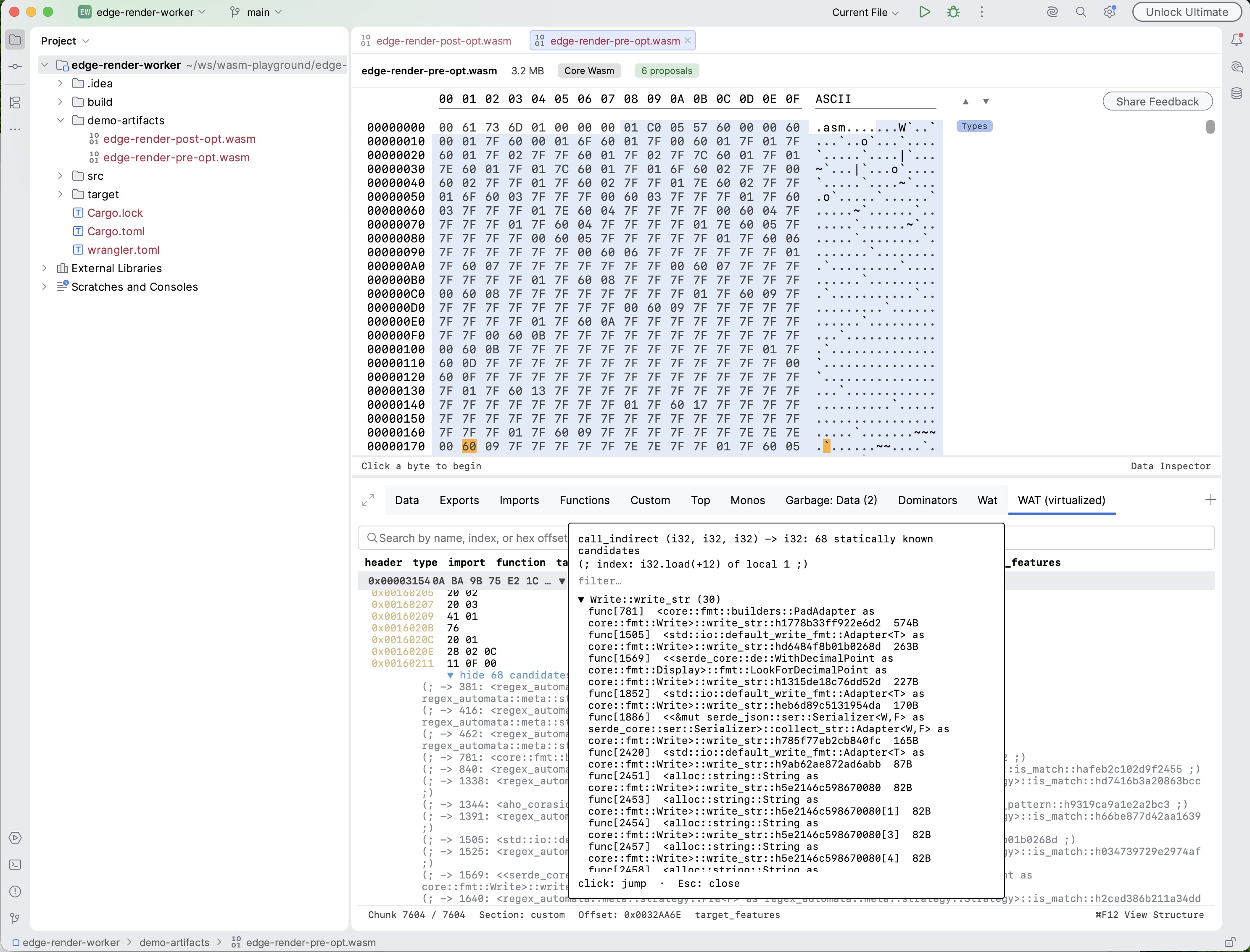
Every call_indirect and return_call_indirect row in the WAT (virtualized) view now shows its statically known dispatch candidates.
How matching works. Candidates are the functions in the element segments (active and passive) whose type signature matches the call site's type. Matching is structural: functions declared under different but identical type entries are merged. Functions written into the table at runtime via table.set are not visible to static analysis.
Navigation. Click the instruction row (or press Go to Declaration) to open a candidates popup. Each entry navigates to that candidate's body in the WAT view. Alternatively, expand the inline show N candidates row beneath the instruction for the full list as click-navigable rows.
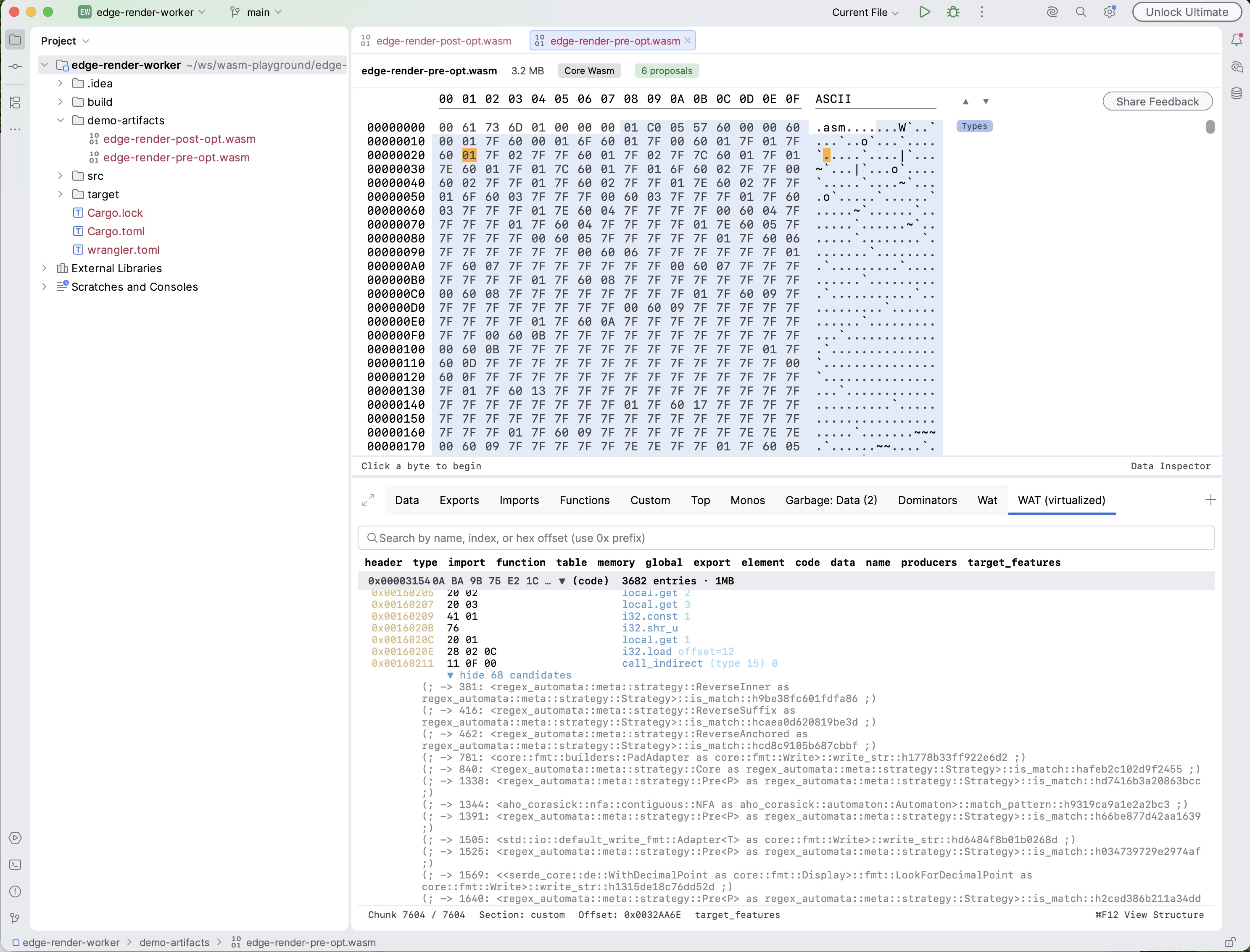
Explicit callout for trapping call sites. When a signature has no matching table entries at all, the row says so explicitly: that call site can only trap. The lists are labelled "statically known", not "all possible targets", to make the approximation clear.
Dispatch tab in WASM diff
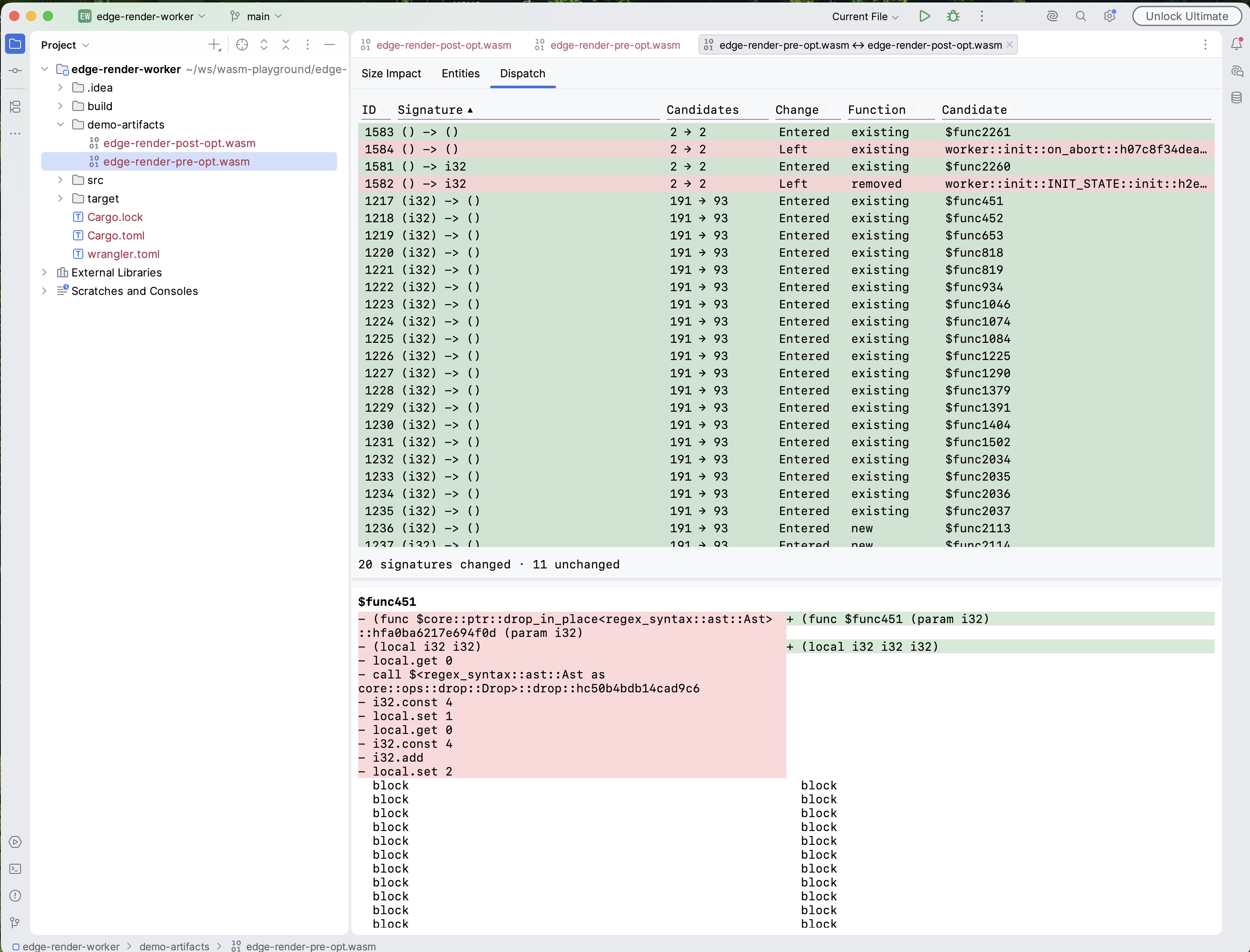
The WASM module diff gains a Dispatch tab alongside Size Impact and Entities. It shows, per canonical signature, which dispatch candidates entered or left the function table between the two builds.
Content-hash identity. Cross-build candidate matching uses the same content-hash function matcher as the Entities tab. Names are not trusted because tools such as wasm-bindgen rename closure shims on every build. Each row distinguishes a brand-new or removed function from an existing function that merely entered or left the table — the quiet mechanism that pins code wasm-opt cannot remove.
Clicking a row opens the side-by-side WAT comparison for that candidate.
Example: wasm-opt -Oz on workers-rs. Running Binaryen's optimiser on a workers-rs module leaves the element segments byte-identical in count while duplicate-function elimination makes hundreds of table slots share one body. The Dispatch tab shows exactly that shrinkage per signature, which the Size Impact and Entities tabs do not surface.
Go to Source
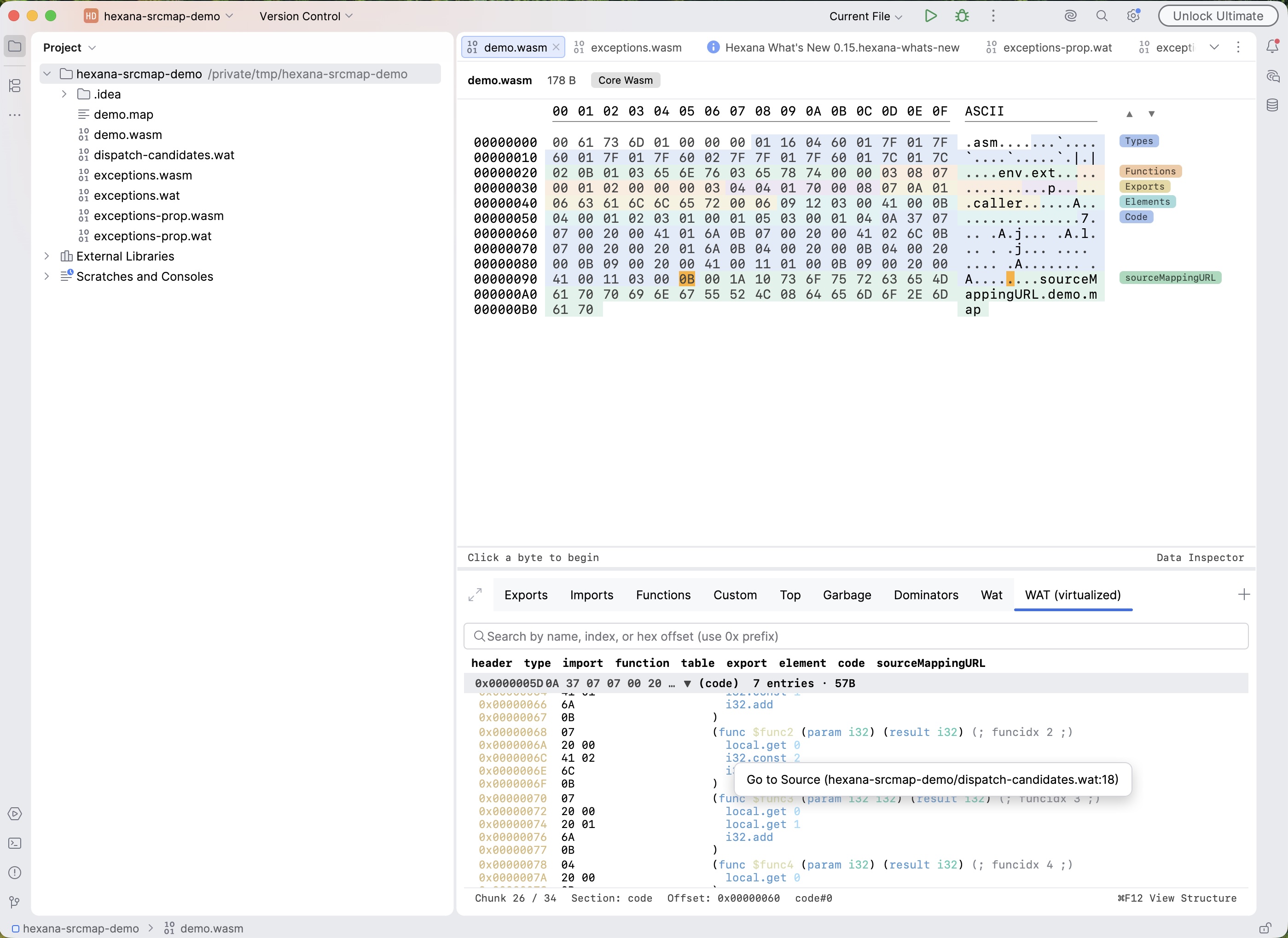
Right-clicking a row in the Functions or Exports tab, or an instruction row in the WAT view, now offers Go to Source (dir/file.rs:123) when debug information is present. Clicking opens the source file at the resolved line in the IDE editor.
Resolution order. Function rows resolve to the function's first mapped line (the signature). WAT instruction rows resolve per instruction. Locations come from DWARF when present, falling back to a source map otherwise.
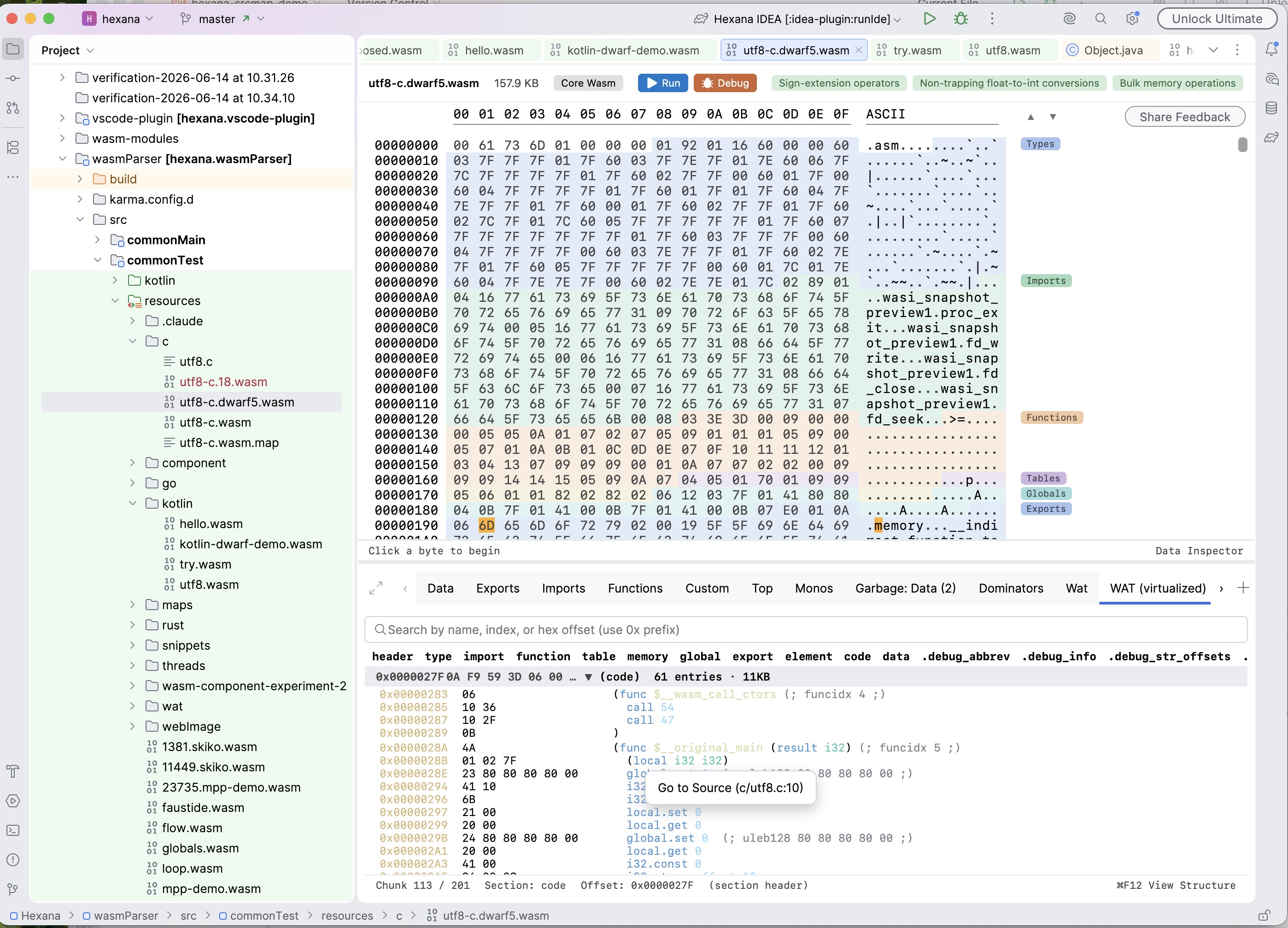
Source map discovery. Source maps are now discovered through the module's sourceMappingURL custom section — the form Kotlin/Wasm and Emscripten emit. A path is resolved relative to the wasm file (absolute paths are accepted), and data: URLs with an inline map are decoded. The existing <file>.map sidecar convention is the fallback. Remote http(s) URLs are not fetched.
The WAT row context menu also carries the dispatch-candidates action on call_indirect rows.
Exception-handling visibility
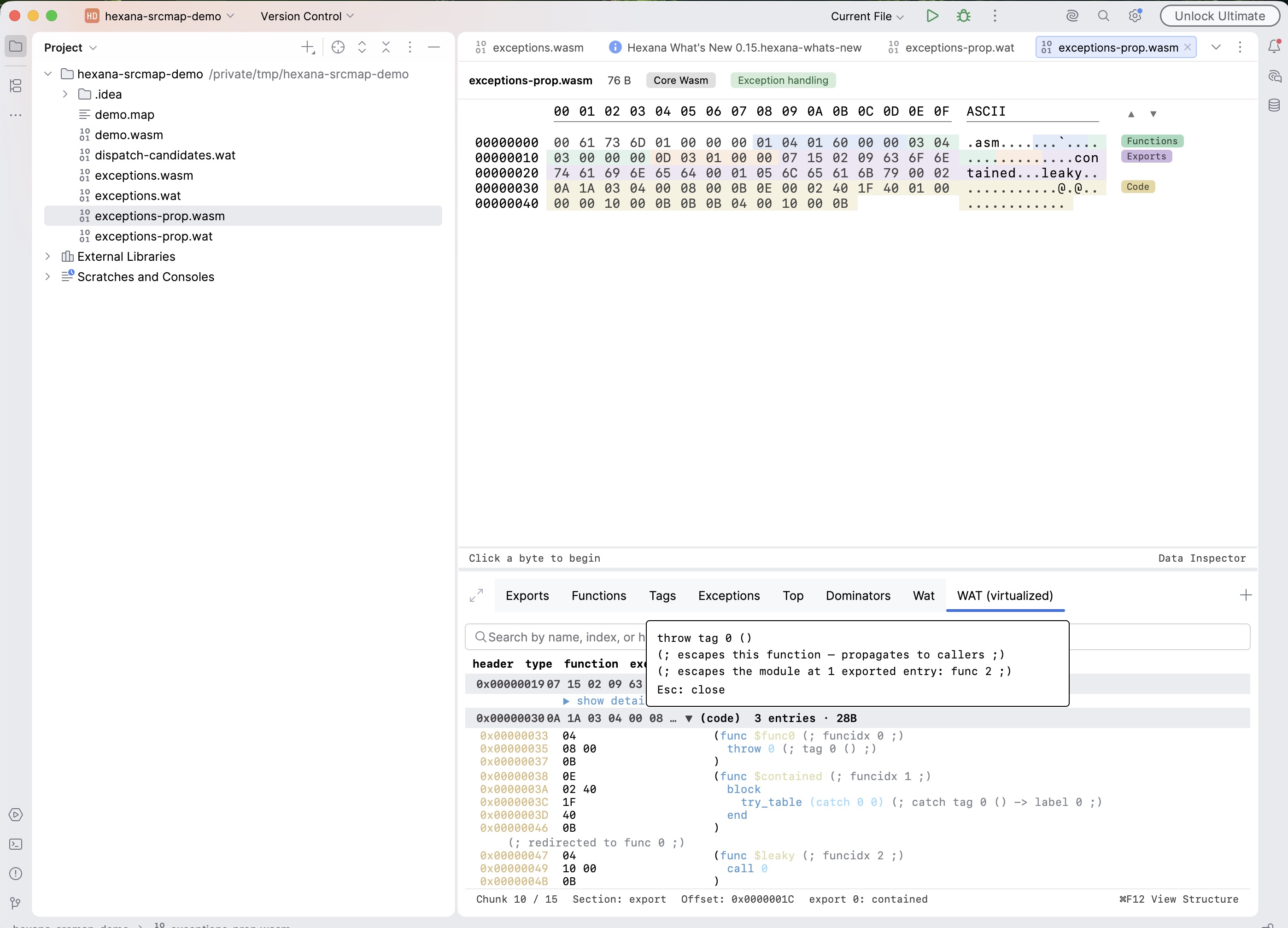
Exception-handling proposal instructions now render with full decoded annotations, and two new tabs expose the module's panic surface.
Instruction rendering
throw, try_table, and throw_ref instructions now render with their real WAT text plus trailing comments that decode each index:
throw 0— the tag index and its payload signature.try_table (catch 0 1) (catch_all 2)— each catch clause's tag and target label.throw_ref— rendered as-is (no index to decode).
Click to resolve
Clicking a throw row resolves where it is caught: the enclosing try_table and clause (tag-specific or catch_all), or a report that the throw escapes the function. For an escaping throw, Hexana names the exported entry points whose callers can receive the exception uncaught.
Tags tab
A Tags tab decodes the module's exception tags: index, origin, attribute, and payload type signature. This is the exception-handling equivalent of the Types tab for function types.
Exceptions tab
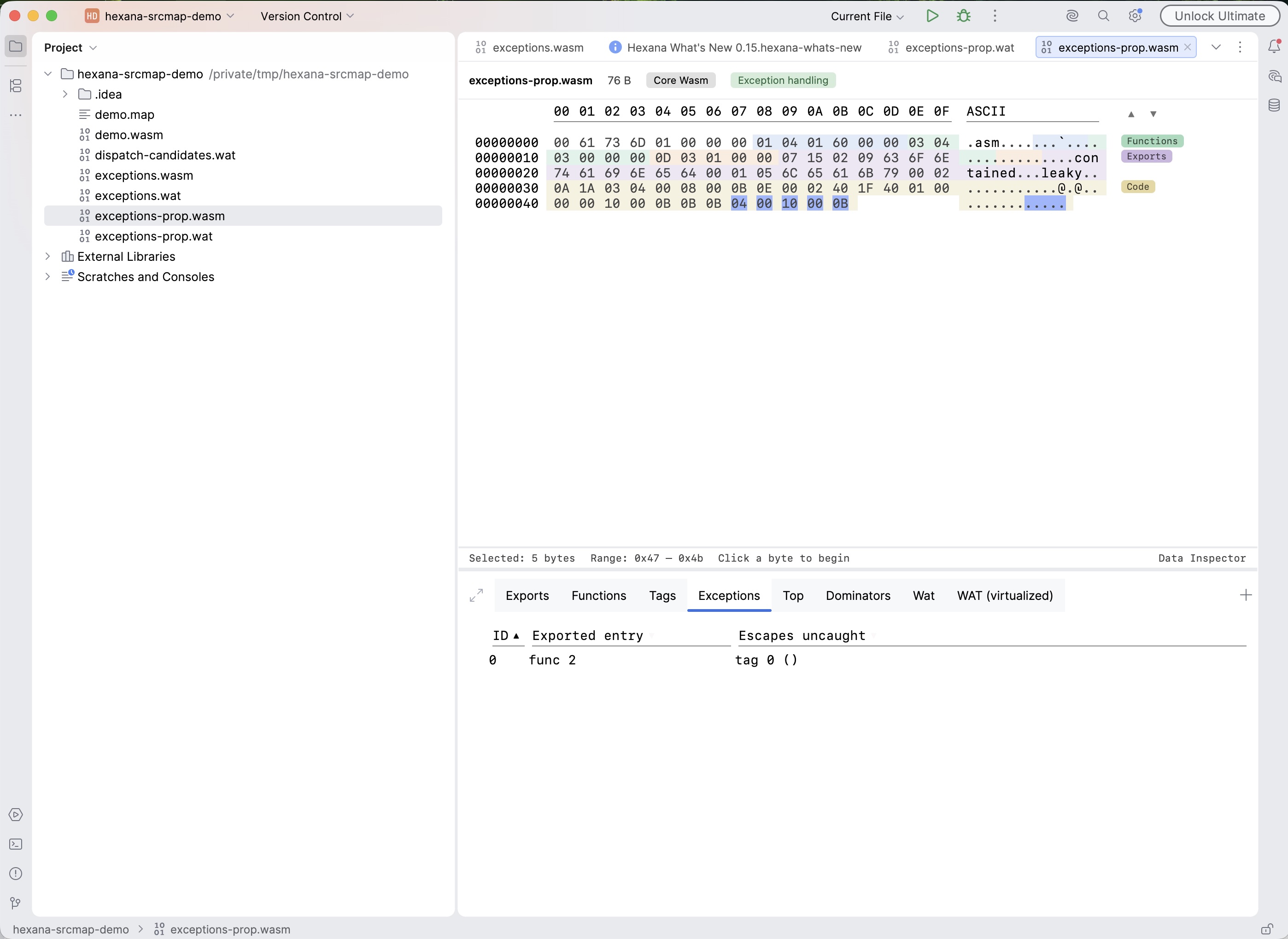
An Exceptions tab shows the module's panic surface: exported entry points whose exceptions escape to the host, with the tags (and any dynamic throw_ref or host-import throws) that can get out.
Sound under-approximation. The analysis is a sound static under-approximation: the escapes it reports are real. throw_ref and imported-function throws, which static analysis cannot trace to individual tags, are tracked as a dynamic category, and a catch_all on the path correctly marks a throw as "caught".
Clickable section labels
Semantic section labels are now clickable wherever a corresponding information tab exists. Clicking the label switches directly to that tab. (The label rendering arrived with 0.14's section highlighting; this release wires up the click target.)
Save As for nested modules and archive entries
Save As is now available from the editor context menu for nested WASM modules (opened from a Component Model component or a diff submodule view) and for entries inside JAR and ZIP archives. The action writes the content to a separate file of your choice on disk.
Top size treemap tab
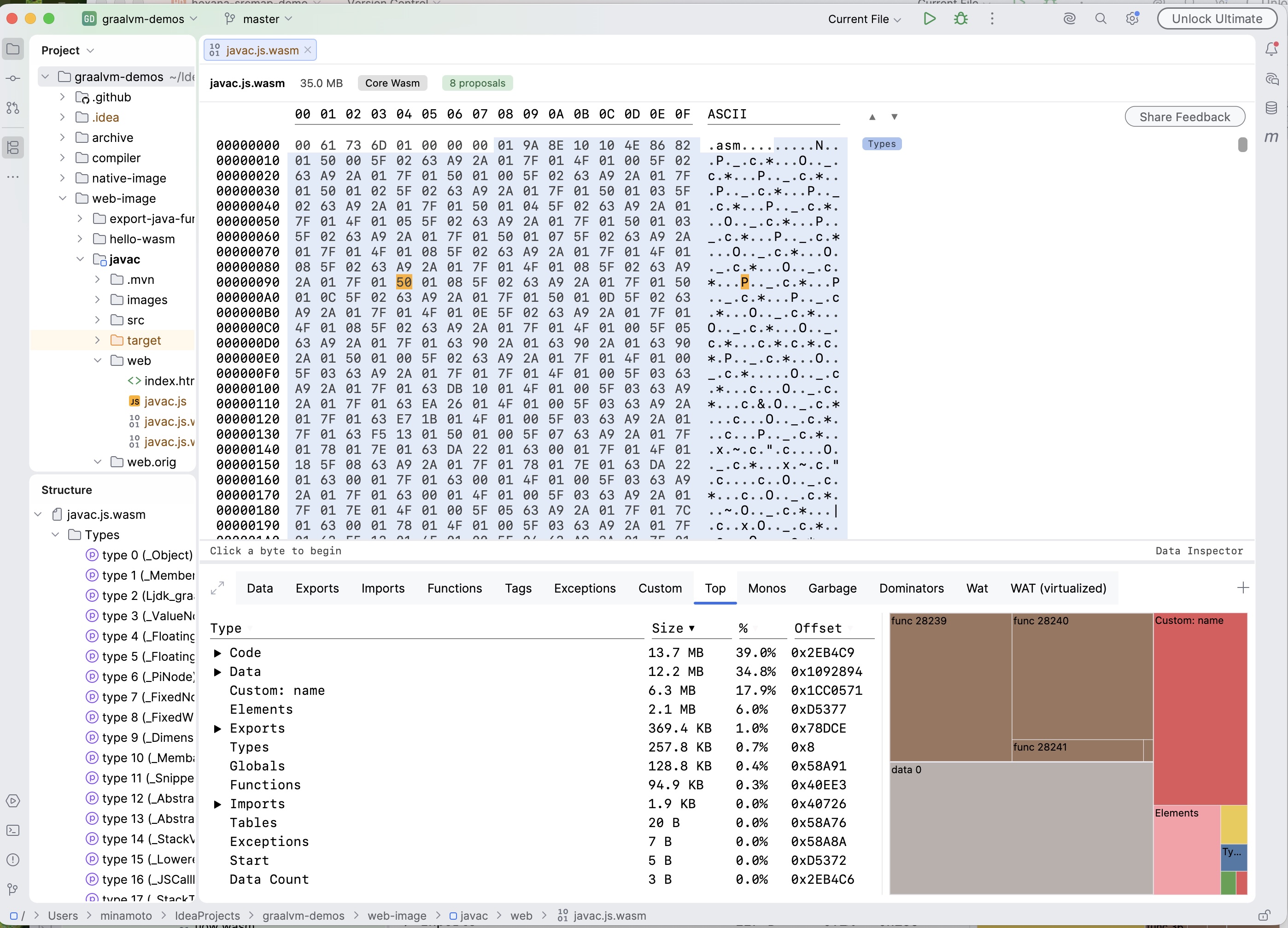
The Top tab gains a size diagram for WASM and native binaries: a treemap that shows the largest entities by size as proportional areas, alongside the existing sortable breakdown.
Changed: indirect-call hub nodes per signature
The call graph now models indirect calls through one hub node per canonical signature — for example <indirect: (i32, i32) -> i32> — instead of the single <indirect calls> node introduced in 0.14. Each indirect-calling function connects only to the hubs of the signatures it actually dispatches through, and each hub fans out only to the table functions matching that signature. In the Dominators and Caller Paths views the grouping now reads "retained by indirect callers of this signature" rather than one undifferentiated bucket. The edge count keeps the same linear bound as the 0.14 fix (call sites plus table entries, now partitioned by signature).
Fixed
Dominators tree empty in 0.14. The compact dominator storage introduced in 0.14 used −1 as its "no parent" marker, which is also the virtual root's node id, so every function dominated directly by the root was dropped from the tree. Function-level CFG dominators were unaffected, which is how it slipped through testing. The tree now renders fully.
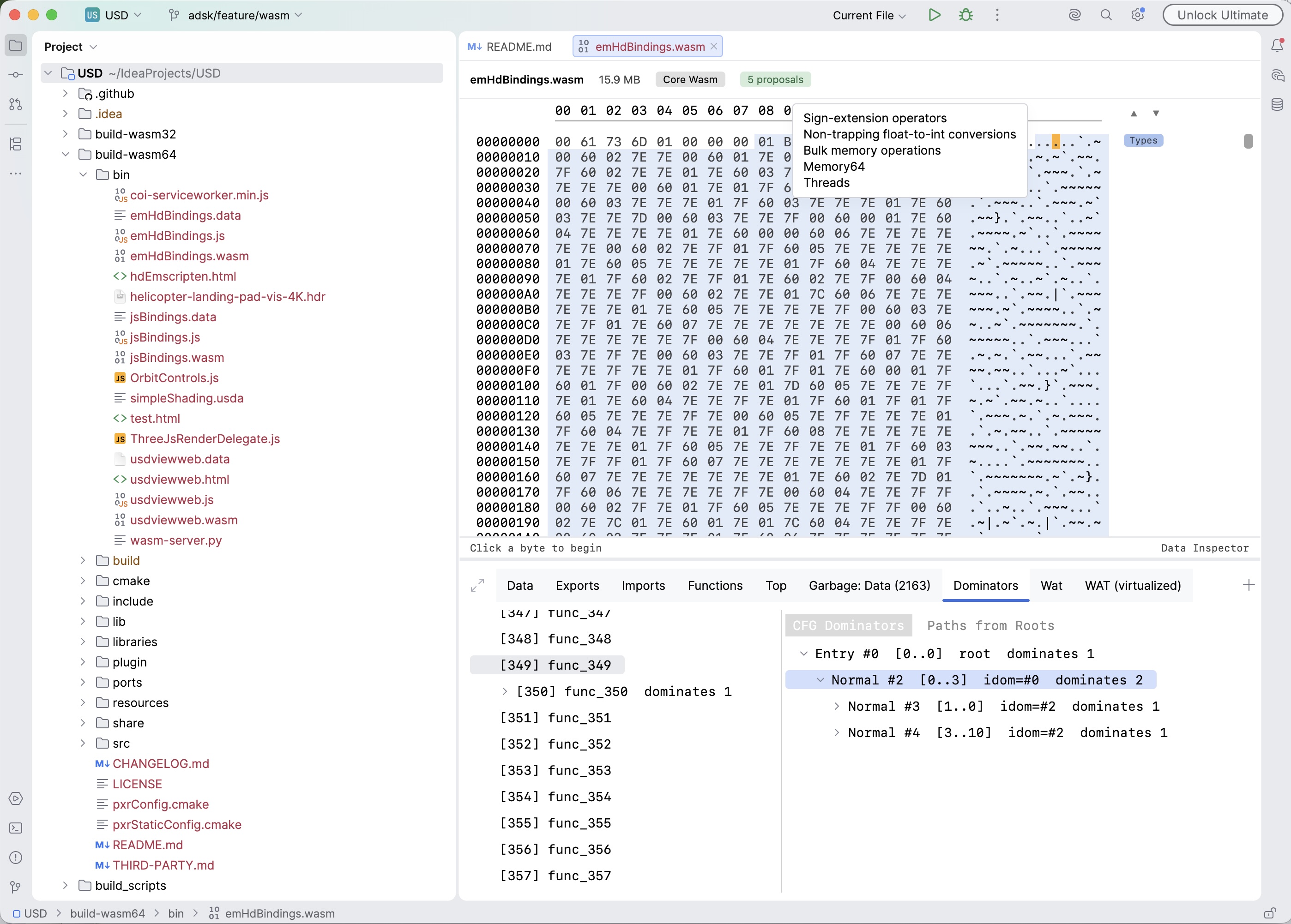
Source locations resolve on Rust-produced modules. The DWARF lookup previously found compilation units by their low_pc / high_pc attributes, which rustc does not emit (it uses range lists instead), so the hex view's "Open in sources" never appeared for Rust artifacts. The lookup now also consults the line tables directly. Two further mismatches are fixed: callers pass module-absolute offsets while WASM DWARF addresses are code-section-relative (queries are now converted, and DWARF-based navigation was one line off as a result), and a module that parses but has no DWARF — the Kotlin/Wasm case — no longer skips the source-map fallback.
Nested table row sorting restored. Rows of nested tables are sorted again according to the parent sorting rules. This also fixes the sort order in the Top tab.
Rare UI freeze on tab switch fixed. A freeze that had occasionally occurred when switching between the Decompiled and other tabs multiple times no longer happens.
Upgrading to 0.15
No breaking changes. All 0.15 additions are automatic or additive.
- call_indirect candidates appear automatically in the WAT (virtualized) view for every
call_indirectrow. - The Dispatch tab appears in the WASM diff editor alongside Size Impact and Entities.
- Go to Source appears in the right-click menu on function/export rows and WAT instruction rows when debug information is available.
- Tags and Exceptions tabs appear automatically for modules that contain exception-handling constructs.
- Save As appears in the editor context menu for nested WASM modules and archive entries.
- The Top tab's size treemap appears automatically for WASM and native binaries.
- Everything runs on your machine. No data is sent anywhere.
Known limitations in 0.15
call_indirectcandidates reflect element-segment entries only; functions written into the table at runtime viatable.setare not visible to static analysis.- Exception analysis is a sound under-approximation: dynamic
throw_refpaths and imported-function throws are tracked as a category, not traced to individual throw sites. - Go to Source does not fetch remote
http(s)source maps. - Carryover from prior releases: the Parquet / Arrow Data tab decodes the first row group or record batch only; schema-less protobuf decoding cannot recover field names; wazero runs modules only; Android DEX support is basic; native-binary and Cranelift backend support are experimental; Java integration covers Java sources only.
Earlier releases
- Hexana 0.14 release notes — 0.14 (2026-07-22): native binary diff, Component Model dependency diagram, data inspector, section highlighting and navigation, MCP schema v3, indirect-call synthetic node, memory64 scalability fixes.
- Hexana 0.13 release notes — 0.13 (2026-07-08): Apache Parquet and Arrow IPC inspection, Protocol Buffers descriptor sets, Structure tool window, custom scriptable JS tabs, wazero run support.
- Hexana 0.12 release notes — 0.12 (2026-06-24): static-library archives, Component Model diff and WAT view, Exports/Imports row affordances, Android DEX, ZIP64.
- Hexana 0.11 release notes — 0.11 (2026-06-11) and 0.11.1 (2026-06-17): module diff with structural matching, Kotlin/Wasm source navigation, GraalVM Native Image with embedded SBOM.
- Hexana 0.10 release notes — 0.10 (2026-05-27), plus the 0.10.1–0.10.3 patch line.
- Hexana 0.9 release notes — 0.9 (2026-05-07), 0.9.1 (2026-05-20).