Component Model Support
Hexana has first-class support for WebAssembly Component Model binaries: it recognises them, lists their nested modules, resolves their imports against the workspace, and composes them for execution.
Detection
A .wasm file is identified as a component when its header carries the Component Model magic + version (\0asm followed by version 0x0a and layer 0x01). The editor toolbar shows a component badge.
Tab availability adapts:
- Modules tab appears (component-only).
- Components tab appears (component-only, since 0.9.0): lists nested components that can be opened recursively.
- Dependencies tab appears (component-only, since 0.8.0).
- Functions, Data, Custom, Monos, Garbage tabs are hidden — these are core-Wasm-only.
- Exports, Imports, Top, WAT, and Summary continue to apply, surfacing component-level entities (interface exports, resources, etc.) rather than core-Wasm function indices.
The Modules tab and nested modules
Components are containers — they typically include several nested core modules plus possibly other nested components. The Modules tab lists this tree:
| Column | Description |
|---|---|
| Path | Hierarchical path within the component, e.g. module[0], module[1], component[0]/module[0]. |
| Kind | core module or component. |
| Size | Byte size of the nested artefact. |
Clicking a row opens the nested module in a new editor tab. The nested editor has the same 11-tab analysis panel and applies recursively if the nested artefact is itself a component.
Virtual filesystem provider
Hexana registers a VS Code FileSystemProvider under a Hexana-specific URI scheme so nested modules have stable, openable URIs without writing to disk. Opening module[0] from a parent component named app.wasm produces a URI like:
This URI is what VS Code routes back to Hexana when the user re-opens, splits, or pins the nested tab. The bytes are extracted lazily from the parent component on demand and never persisted.
Submodule → parent backreference
When you open a nested module, the editor toolbar shows a backreference: a clickable link labelled with the parent's filename that returns you to the containing component's editor tab. This makes deep drill-down navigable without keeping a mental stack of open tabs.
Virtualized WAT for embedded core modules (0.6.1+)
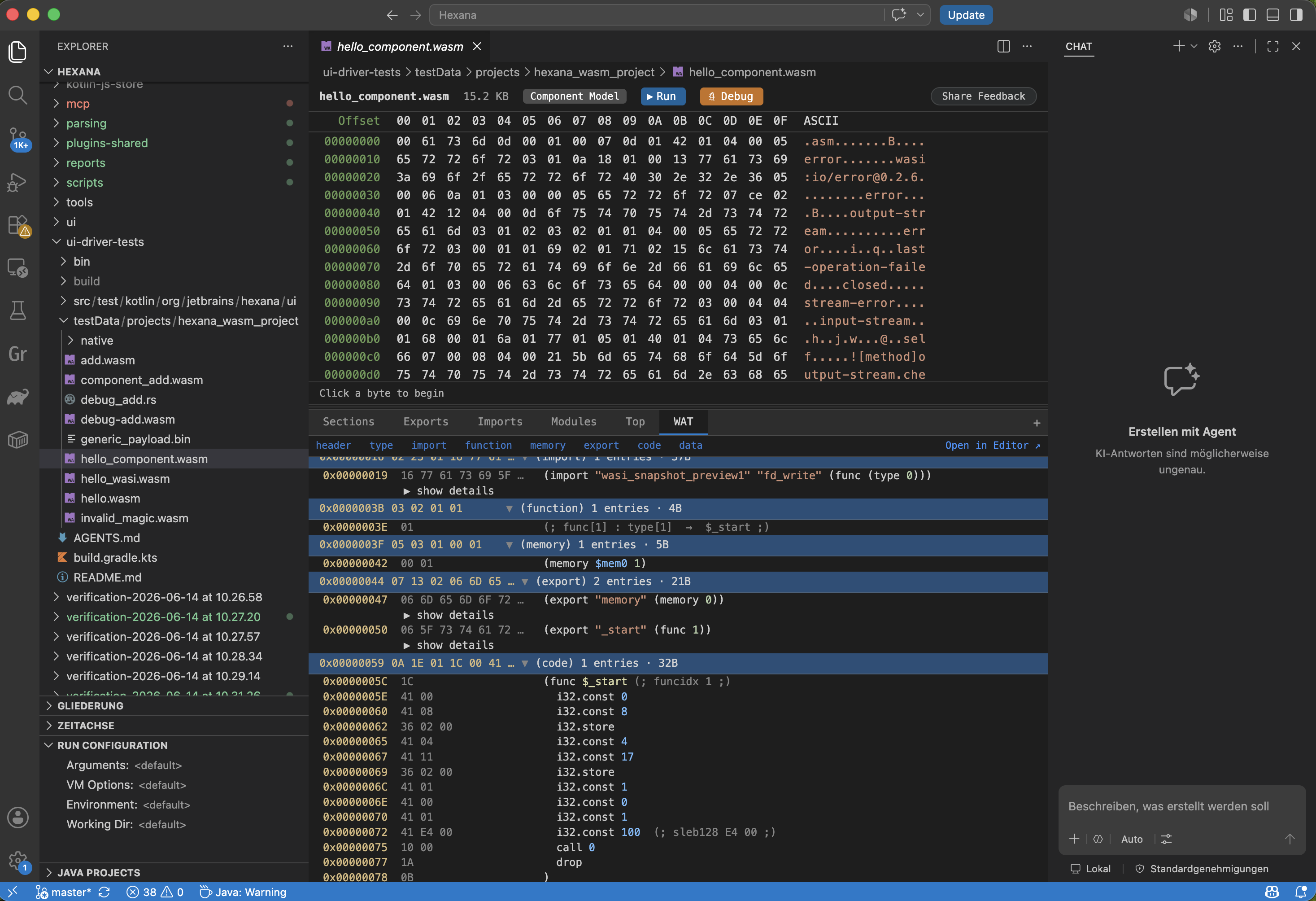
The WAT tab on a component binary renders its embedded core modules using the same virtual-scrolling WAT renderer as standalone core modules (introduced in 0.5.0). When the component contains more than one embedded core module, a module selector at the top of the WAT panel lets you switch between them. Each module's text is generated and rendered independently — you are not looking at a merged WAT dump.
Save as (0.8.0+)
Any nested module visible in the Modules tab can be saved to a standalone file on disk with the Save as action. Use this to extract a core module from a component for analysis in isolation (for example, running it through an external optimizer or disassembler).
The Dependencies tab (0.8.0+)
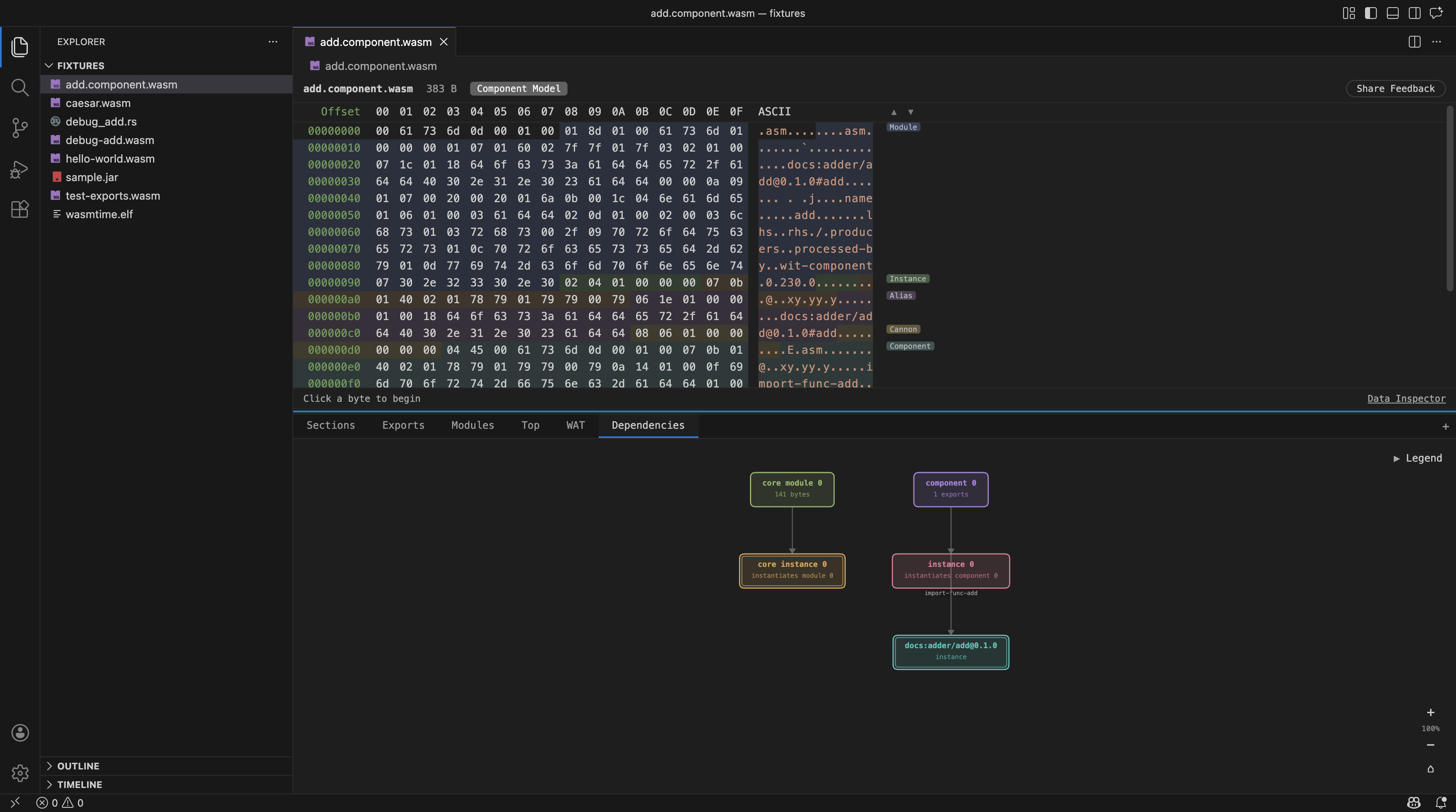
Component Model binaries gain a Dependencies tab — a node graph showing the internal structure of the component: its core modules, nested components, the core and component instances created from them, and the interface imports and exports (such as docs:adder/add@0.1.0) that connect them to the outside.
Since 0.11.0 the graph is navigable: double-click a module or nested component to open it in its own editor tab, or double-click an import/export to select its bytes in the hex view.
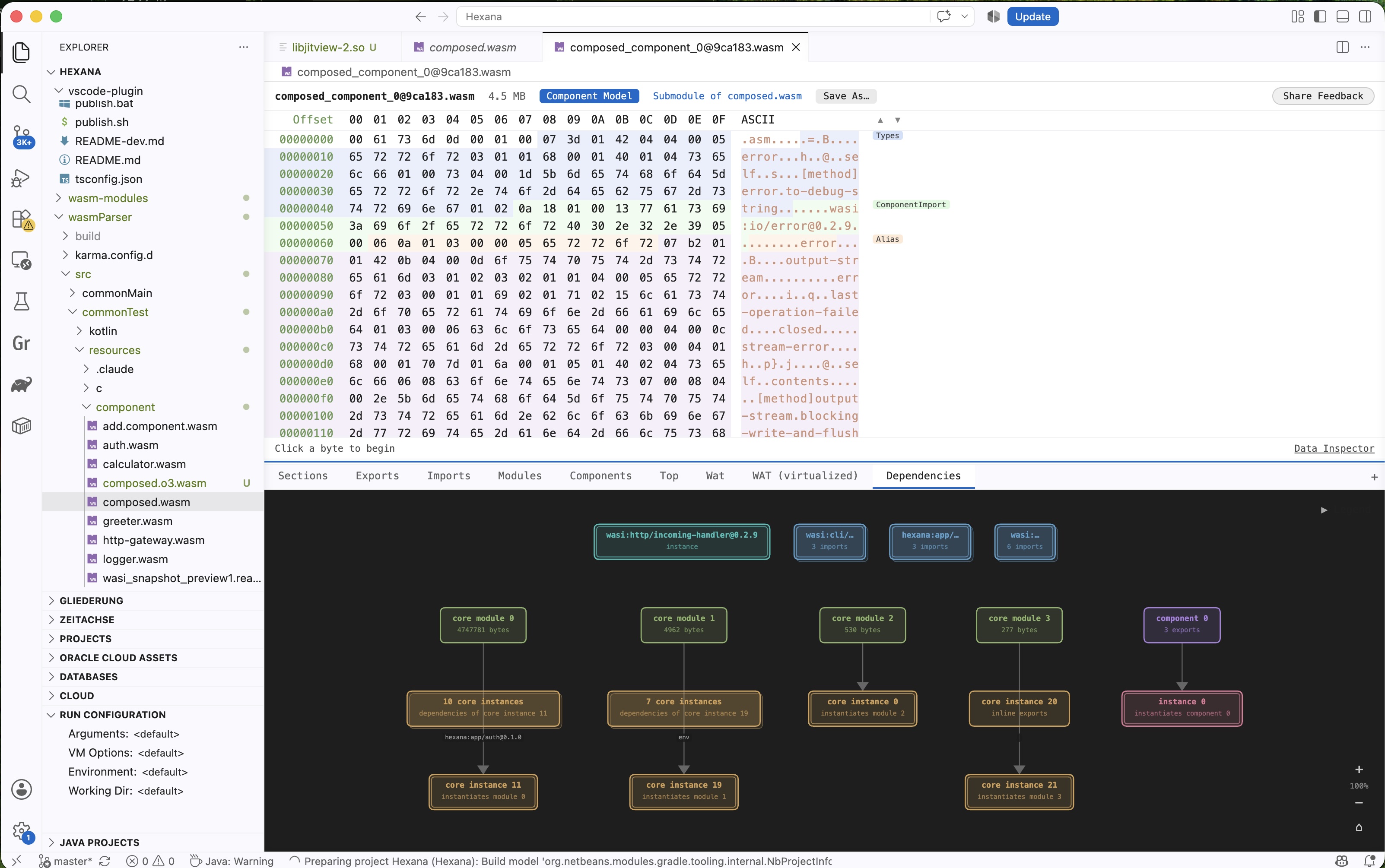
The layout is computed from the component's binary structure; no external tool or network access is required. A Legend identifies node kinds by colour.
This tab is available for Component Model binaries only.
Nested components (0.9.0+)
Nested components of a WASM Component open in their own view from the Components tab, just like embedded core modules. Opening works recursively: a nested component that itself contains further nested components can be drilled into without limit. Each level of nesting shows the same analysis panel as a top-level component.
Dependency resolution
Components import interfaces from other components. To run one, you need a composed bundle that includes the target plus every transitively-required dependency. Hexana automates this.
The algorithm
When the user clicks Run on a component binary, Hexana:
- Reads the target's imports — every imported interface, with its fully-qualified name (
namespace:package/interface@semver). - Scans the workspace for
.wasmfiles. For each file: - Parses it (cached through
WasmBinaryDataCacheService). - Identifies it as a component (skip otherwise).
- Records every interface the component exports.
- Matches imports to exports by fully-qualified interface name.
- Recursively resolves the dependencies of each matched dependency, until the closure is complete or an unresolved import is hit.
- Returns the dependency set (a list of
(path, role)pairs) to the Run flow.
The implementation lives in extension-lib/, in DependencyResolver.kt, and is shared with the JetBrains plugin via the plugins-shared KMP module.
Workspace search scope
By default, Hexana searches every .wasm file under every workspace folder, recursively. There is no setting to limit the search scope; if performance becomes an issue on large workspaces, raise a tracker issue.
Files in .gitignore, node_modules, target, and similar paths are not automatically excluded — Hexana looks at everything VS Code's workspace API exposes. If a stray .wasm in a build artifact directory accidentally matches an import, it may be picked up.
When resolution fails
If an import has no matching workspace component:
- The Run flow falls back to import-stub generation for that interface — synthesised noop / trapping implementations are preloaded.
- The user sees a warning in the run dialog listing which imports were stubbed.
This means a component will run even when the user hasn't checked in every dependency, but it may trap when it tries to actually use a stubbed import.
Composition
After resolution returns a complete dependency set, Hexana invokes a composition tool:
wasm-tools composeis the first choice when available — it is the Bytecode Alliance's mainstream component-composition CLI.wac plugis the fallback — a lighter, simpler composition tool also from the Bytecode Alliance.
Hexana detects which is on PATH and adapts. If neither is installed, the Run flow stops with an actionable install hint. If both are installed, wasm-tools wins.
The composition produces a single self-contained component in a temporary directory, which the chosen runtime then executes. See run-support.md for the full run flow.
Limitations
- No interface-level export/import drill-down UI — the Exports and Imports tabs list component-level entities by name, but there is no IDE-style "go to definition" jumping between a component's import and the corresponding export in a sibling component.
- No WIT support —
.witfiles have no language support in the VS Code extension (the JetBrains plugin has full WIT language support, see../jetbrains/wit-language.md). - No component-instance edit — read-only inspection only.
- No interface-version conflict reporting — if two dependencies require different
@semverversions of the same interface, Hexana picks one and proceeds; you may want to verify the choice manually. - Debugging across component boundaries is Wasmtime-only; WAMR's debugger does not yet surface nested-module symbols.
See also
features.md,run-support.md,analysis-tabs.md.- The Bytecode Alliance's Component Model documentation.
- The JetBrains plugin's WIT language reference for editing component interfaces.